Runs onLinuxmacOS

Make beats. Pay nothing.

A free, open source DAW with an FL-style piano roll and step sequencer, and an Ableton-style playlist. Built for Linux first. Runs on macOS too.

Get kilowav

kilowav takes the piano roll, step sequencer and mixer you know from FL Studio and puts them next to an Ableton-style playlist. It’s free, open source, built in Rust, and made for Linux first.

The kilowav window with the Rain example project open: the sample browser on the left and the Arrangement tracks beside it.
The kilowav window. The Rain example project in the Graphite theme.Open the full capture

Why kilowav

Free, for good.
No price, no trial, no subscription. kilowav is licensed under the GPL-3.0-or-later, so it stays free.
Linux first.
Built for Linux first, and it follows your Omarchy theme. It runs on macOS too, where most of the testing has happened so far.
PipeWire, natively.
Play through PipeWire directly, or stay on ALSA, the default. One switch in View → Audio.
FL-style piano roll and step sequencer.
Left-click draws, right-click deletes, the last note length sticks. FL’s keys, FL’s tools, FL’s swing.
An Ableton/Bitwig-style playlist.
One sound per track, clips laid out in time, linked copies that update together.
Eleven built-in effects.
EQ, compressor, limiter, OTT-style multiband, saturator, filter, delay, reverb and more, all included.
Your plugins.
Load CLAP and VST3 instruments and effects. The plugin scan checks each one in its own process, so a plugin that crashes while it’s scanned is skipped.
Exports that sound like playback.
WAV, MP3 and stems all include your plugins, effects, sends and automation.
Automation.
Draw volume, pan, plugin parameters and effect knobs over time.
Themes.
Dark, Light and Graphite built in, your own theme files, and a Follow system mode that tracks Omarchy live.


Edit

A piano roll that feels like home

Draw, paint, slice and select with FL Studio’s tools and keys, and arpeggiate, strum, chop or randomize a selection with one key. Pick a key and scale for the whole project, next to the tempo, and snap every note to it. Shape velocity, pan, fine pitch and release in the event lane. See other tracks’ notes as ghosts. Quick legato, glue, quantize and transpose are one key away. Keep it full screen, or dock it under the playlist.

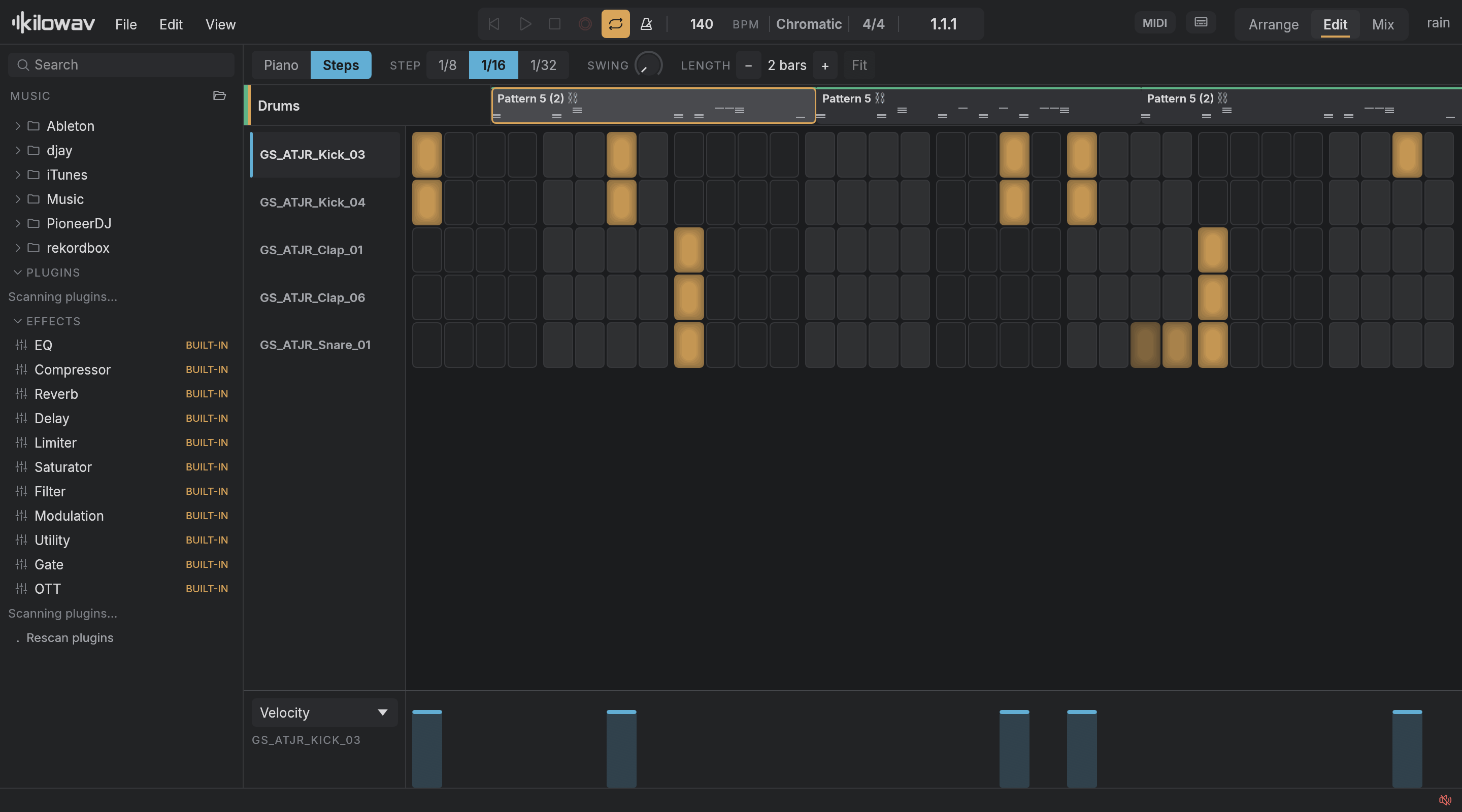
The kilowav step sequencer: five drum rows of tall pads in groups of four, with a two-bar pattern lit in amber.
Rain in Steps. Five sample pads, two bars, 1/16 steps.Open the full capture

Drums the FL way

Add a drum track, drop your samples on it, and click in a pattern. Fill every 2, 4 or 8 steps, shift rows, set per-step velocity, and add FL-style swing. Every drum sound can get its own mixer strip, so the kick and snare get their own effects.

MIDI files, dragged in

Drag a .mid file from the browser onto the piano roll to merge its notes into your pattern, or onto the playlist for a new pattern and clip, with a new track for each extra MIDI track in the file.

Play and record

Plug in a MIDI keyboard and play; kilowav finds it on its own. No keyboard? Use your computer keys, FL style. Arm, count in and record, punch in and out, and loop-record layer after layer. Notes land where you played them.

Arrange

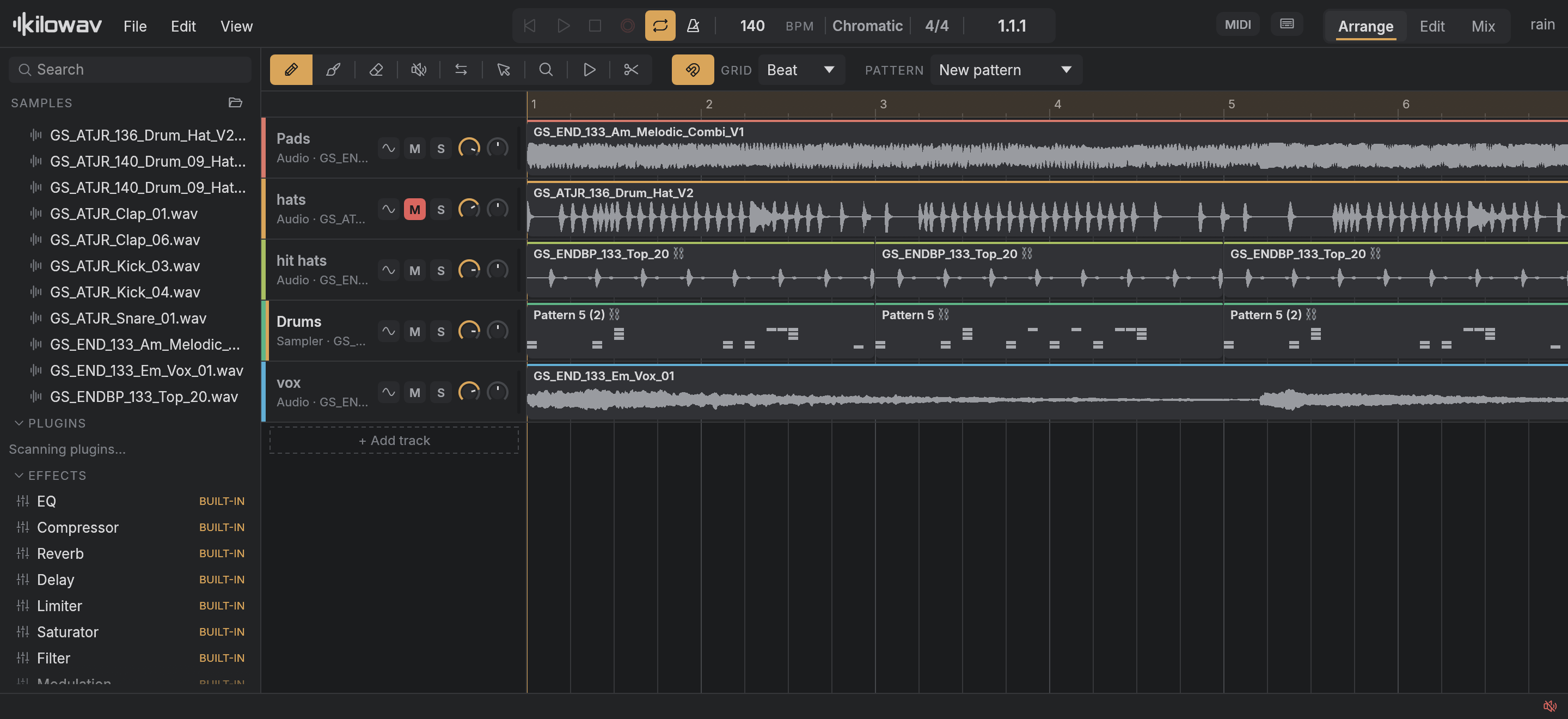
Close view of the kilowav Arrangement: track headers for Pads, hats, hit hats, Drums and vox, with waveform clips and linked drum pattern clips over four bars.
Audio clips and linked drum patterns in the Rain arrangement.Open the full capture

A playlist built for arranging

Lay clips out in time, one sound per track. Copies stay linked, so fixing one fixes all of them, and “Make unique” splits one off when you want a variation. Paint repeats, slice, slip, mute, and insert or delete time across the whole song. Loop the way you like: FL’s ruler drag or Ableton’s loop brace. Drag a track up or down by its header to reorder.

Loops that follow your tempo

Drop a WAV, MP3, FLAC, OGG, AIFF or M4A loop and it lands on an audio track with its waveform. kilowav guesses the loop’s BPM from its length. Turn on Fit to tempo and it locks to your song, pitch intact. Reverse it, shift its pitch by up to two octaves, and set its gain in the clip editor. Drag a whole batch of files in from Finder and each gets its own track.

Automation

Draw lanes for volume, pan, any instrument plugin parameter, or any knob of a built-in effect. Right-click a knob and pick Automate to start a lane. Chop, duplicate and link automation clips like FL, bend any line with a handle, and type exact point values. What you draw is what you hear.

Mix

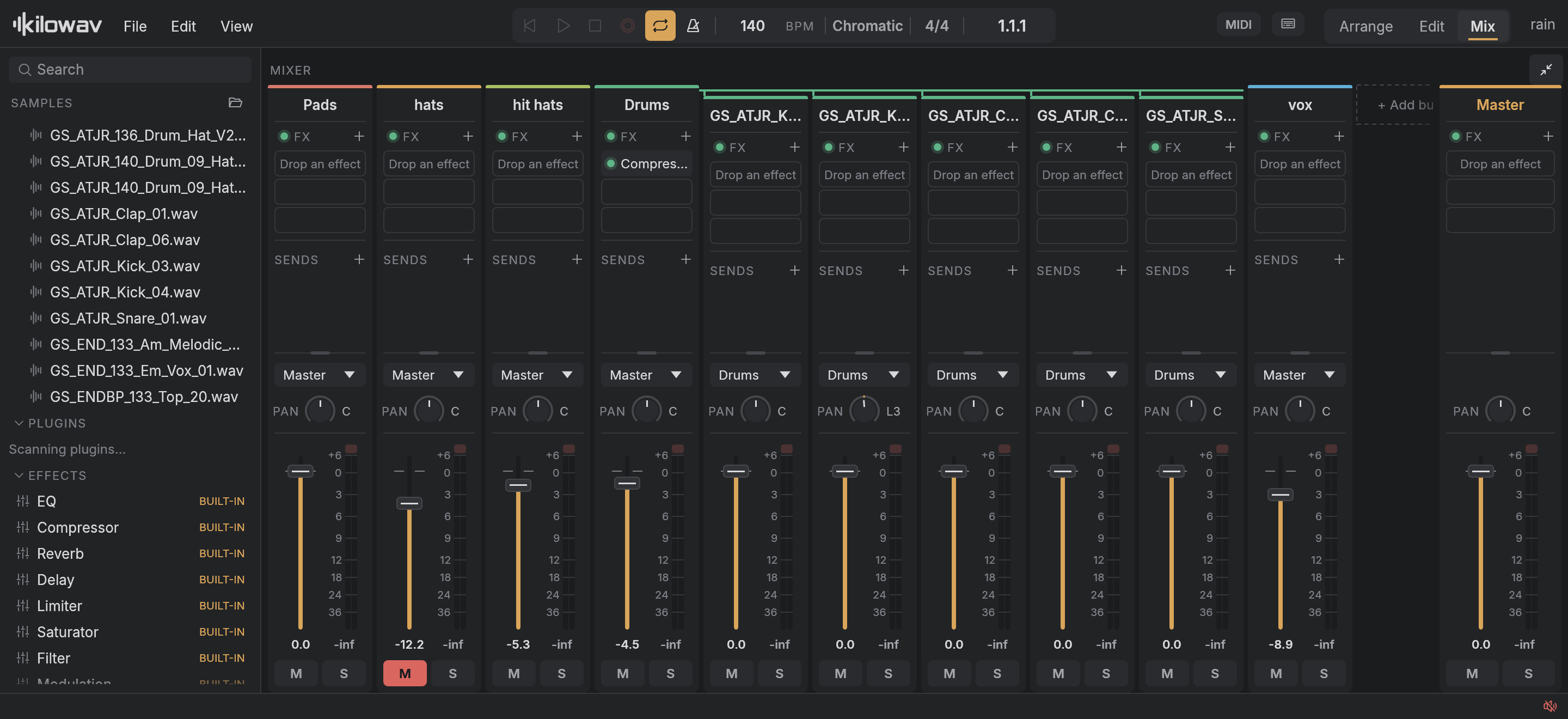
The kilowav mixer: a strip for each track, five drum pad strips joined to the Drums track, inserts, sends, pan, faders and meters, and the master on the right.
The Rain mixer. Track strips, one strip per drum sound, and the master.Open the full capture

A mixer you can route

Every track gets a strip. Add buses, set any strip’s output, and send to reverbs and delays. Solo a bus and you still hear what feeds it. Light switches on every effect slot and one FX switch per strip make A/B checks instant. Resize the meters, or split the mixer under your playlist to mix while you arrange.

Plugin delay compensation keeps every path in time: plugins, lookahead limiters and compressors, sends, buses and sidechains all line up, in playback and in every export.

Light and normal projects stay on one core. kilowav spreads across your cores by itself only when one can’t keep up, and then a strip that misses its turn goes quiet for a block rather than the whole mix dropping out.

Effects in the box

Eleven built-in effects, each with its own editor and meters.

Faders, pan and built-in effect knobs respond live as you drag, with one undo step on release. Escape puts the sound back.

Every knob can be dragged, scrolled, reset with a double-click, or typed into, with units like -6 dB or 1.2k.

EQ
Up to eight bands and a live spectrum.
Compressor
Nine styles, from transparent Clean to Pump, Opto, Vocal and Upward, plus Range, Hold and 0–200 % Mix. Takes a sidechain from another strip, for pumping bass.
Gate
Takes a sidechain from another strip, for tight drums.
OTT
A three-band upward and downward compressor in the style of the classic OTT.
Limiter
On the master of every new project.
Saturator
Soft, Tube, Hard and Bitcrush modes.
Filter
Six types, with cutoff, resonance and drive.
Delay
Four taps, with tempo sync.
Reverb
Room, damping, width and pre-delay.
Modulation
Chorus, flanger and phaser.
Utility
Width, bass mono and phase.

Bring your plugins

kilowav hosts CLAP and VST3 instruments and effects. It scans each plugin in its own process, so one that hangs or crashes during the scan is skipped, not fatal. Plugin windows open on their own (on Linux they haven’t been tried on a real desktop yet), and their state saves with your project. Pair it with free synths like Vital or Surge XT.

Sublime: 808s that slide

kilowav has Sublime, its own 808 and bass instrument (VST3 and CLAP, so it goes where you go; build it with one command, see the manual). Point it at your sample folder and it finds every 808’s key by ear. Hold a note as long as you like, even past a short sample. Slide between notes, stack unison, and shape it with ADSR and low and high pass filters.

Finish

Export what you hear

Export a WAV, an MP3 or a folder of stems. Plugin instruments and effects are in the render, with built-in effects, sends, buses, sidechains and all your automation, so the file sounds like playback. It renders in the background with a progress window and a Cancel button. Stems give you one WAV per track, bus and drum pad after its effects, fader and pan, plus a Master.wav of the finished mix. MP3 is 320 kbps. If a plugin is missing, kilowav tells you before it writes anything, and you choose whether to go on.

Bounce to audio

Right-click a clip and pick Bounce to audio. kilowav renders it through the track’s effects and puts the result on a new audio track right below, with the same fader, pan, sends and automation. The original is muted, not deleted, and it’s one undo step. Good for a heavy plugin you want to print, or a sound you want to keep.

Projects you can share

A project is a plain folder: a .kilo file and your samples. Export it as one ZIP and send it to a friend. Autosave runs in the background every minute. A crash also saves your unsaved changes, and reopening the project offers them back. An autosave you ignore is kept as autosave.ignored.kilo, so nothing you turned down is lost.

A plugin that produces invalid audio costs one silent block, never the rest of the song: it keeps playing from the next block.

Make it yours

Pick Dark, Light or Graphite, or write a theme file with just the colours you want to change. On Linux with Omarchy, Follow system picks up your Omarchy theme and switches with it, live. View → Clip opacity fades the playlist clips when you want the grid to show through. Fold the browser to a thin rail, or hide it until your pointer rests at the left edge.

Made for

FAQ

How much does it cost?

Nothing. kilowav is free and open source under the GPL-3.0-or-later.

What platforms does it run on?

Linux and macOS. kilowav is built for Linux first, but most testing so far has been on macOS, and plugin windows on Linux haven’t been tried on a real desktop yet. Windows is not tested.

How do I install it?

On Linux, build and install it for your user with packaging/install-linux.sh; on macOS, with packaging/install-mac.sh. Otherwise, build it from source with Rust (Linux and macOS builds also need make, sh and a C compiler, for the MP3 encoder). The steps for each Linux distro and for macOS are in the manual. There is no installer yet. The repository needs access at this time.

Which plugin formats work?

CLAP and VST3, instruments and effects. VST2 and LV2 are not supported.

Does it have a built-in synth?

Not a synth. It has a sampler for drums, Sublime (its own 808 and bass instrument, built as a VST3/CLAP plugin) and eleven built-in effects. For synths, use a CLAP or VST3 plugin such as Vital or Surge XT.

What’s the project format?

A folder with a .kilo file (JSON) and a samples/ folder. Export as ZIP (or as a .kilowav, the same thing under its own name) bundles it all into one file, which Open or a drop onto the window unpacks and opens. Export to audio writes WAV, MP3 or one WAV per track (stems).

Can I record audio?

No. kilowav records MIDI, from a MIDI keyboard or your computer keys.

Is it stable?

kilowav is young and still growing. Autosave runs every minute, and the plugin scan isolates crashing plugins. Some things are not there yet: for example, exporting through plugins has been tested most on one VST3 so far. The manual’s Known limits lists them all.

Get kilowav

The repository is private at this time. You need source access to build kilowav.

There is no installer and no prebuilt download yet. You build kilowav from source with Rust. It takes a few minutes the first time.

Open the repositoryAccess required
Platform
sudo apt install build-essential git pkg-config libasound2-dev libclang-dev libpipewire-0.3-dev libgl-dev libx11-xcb-dev libxcb1-dev libxcb-dri2-0-dev libxcb-icccm4-dev libxcursor-dev libxkbcommon-dev libxcb-shape0-dev libxcb-xfixes0-dev

git clone https://github.com/novacon/kilowav.git
cd kilowav
packaging/install-linux.sh
sudo pacman -S base-devel git alsa-lib pkgconf clang pipewire libx11 libxcb libxcursor libxkbcommon mesa

git clone https://github.com/novacon/kilowav.git
cd kilowav
packaging/install-linux.sh
xcode-select --install

# After the Command Line Tools finish installing:
git clone https://github.com/novacon/kilowav.git
cd kilowav
packaging/install-mac.sh

Install Rust 1.90 or newer with rustup first. The install script builds kilowav and Sublime and installs them for your user, with no root. Run it again to update. To run kilowav without an install, use cargo run --release -p kilowav-app. Package lists for other distros are in the manual and the README.